The MegaShift™ V5.202 S19 file is here:
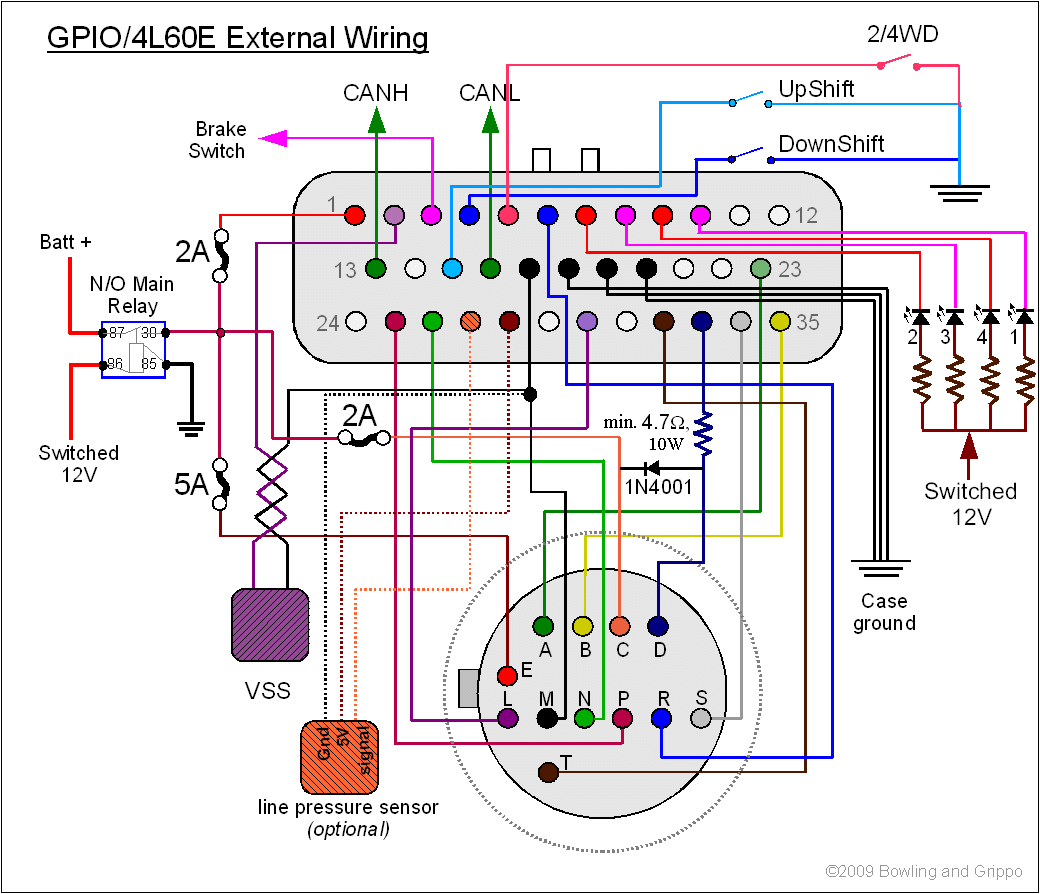
Note: When in bootloader mode, the GPIO allows a full 12V to flow in the TCC and Output3 (aka. TCC, SolC) circuits. If your set-up depends on PWM to limit the current in these solenoids, you MUST pull the 5 Amp fuse to these solenoids (shown in this wiring diagram) before entering bootloader mode to load new code. The 4L60E does not need to have the fuse pulled in bootloader mode when wired as instructed.
The accompanying INI file is below, you will need it for your tuning software. Do NOT rely on the INI that comes with your tuning software, even if it has the correct version number it may be out of date and not have the latest updates and corrections.
This INI fully supports the 'context menu help' feature added in TunerStudioMS versions 1.30 and up.
The tuning software guide to all the tuning parameters in the V5.202 code is here: V5tune.html
This code and INI have several Project Property Settings. You set/change them in TunerStudio under 'Project → Project Properties → Settings'. This is the first thing you should do after creating a new project. The settings are:
| Activated | Deactivated |
|
|
This setting is independent of the Celsius/Fahrenheit setting above.
Loading Code on Your MShift™ Controller
To use the downloader.exe:
When upgrading from older code, be sure to save the old user parameters in a MSQ, load the new code and set up the new INI, change your units (Project -> Project Properties -> Settings: CELSIUS and SI_LENGTHS) to what you used when creating the older MSQ before finally loading the old MSQ file. The defaults are for both settings to be deactivated (i.e. Imperial units). Once the units are set, you don't have to worry about this anymore.
To set up a CAN pass-through connection with TunerStudioMS, see this video: CAN set-up video (22 MBytes)
Once you have loaded the code, you need to create a project in TunerStudioMS using the INI file above:
Here is a video on setting up the CAN pass-through in TunerStudioMS: CAN set-up video (22 MBytes)
Older code/INIs can be found here: